Digital Compass - GPS Compass
- 4.2
- Rating
- 1.00M
- Installs
- Free
- Price
 Analysis by App-foxy
When I need a quick sense of direction, I usually want something simpler than a full navigation app. That is the space occupied by Digital Compass - GPS Compass, a free Travel & Local app from Infinity Tech Systems. I tested it with the expectation that it would handle one focused job: turn an Android phone into a readable digital compass without making me plan an entire route.
That focus is its biggest appeal. The app is aimed at people who want a straightforward heading while walking, travelling, checking a map, or orienting themselves outdoors. It is not trying to replace a complete navigation service, and I think that distinction matters before installing it. If you want a clean directional tool, it is worth considering. If you need turn-by-turn guidance, saved places, traffic information, or a detailed trip planner, a broader navigation app will probably suit you better.
What I considered before relying on it
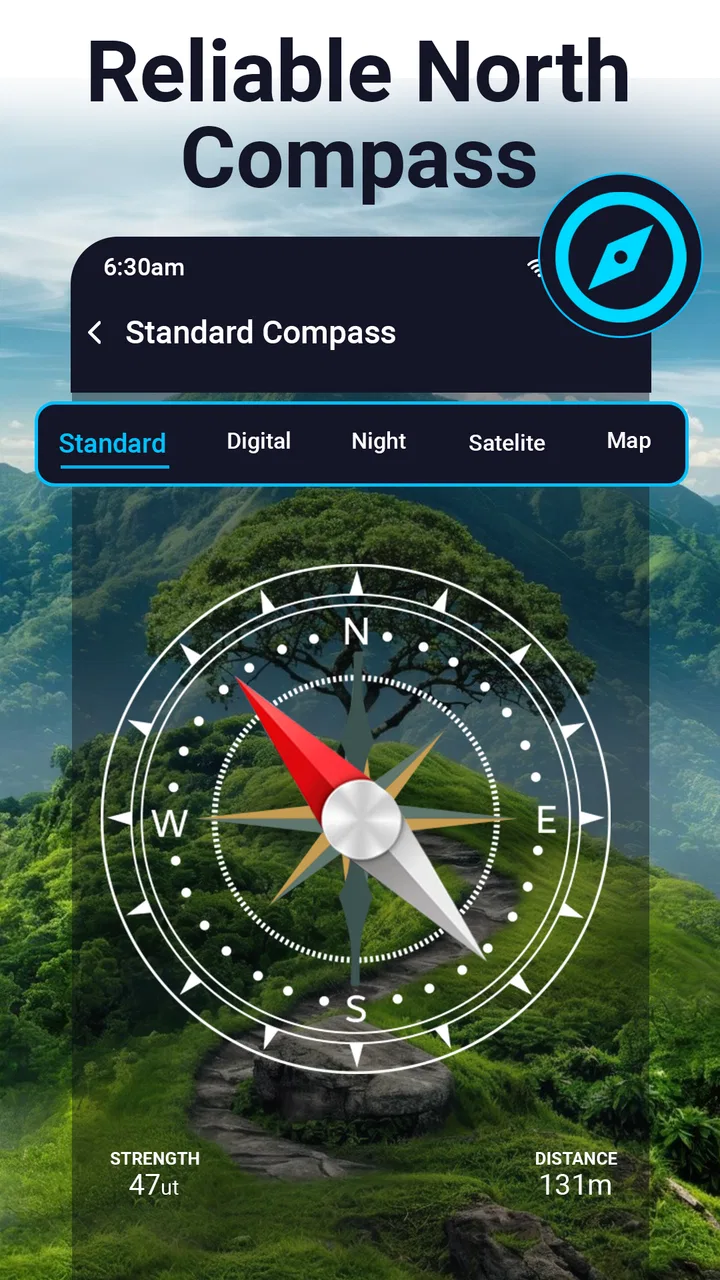
My first decision criterion was clarity. A compass is only useful if I can understand the direction immediately, especially when I am standing outside with one hand occupied or checking the screen briefly. The app presents itself as a digital compass and GPS compass for Android, so I judged it less like a travel planner and more like a dedicated instrument.
You May Also Like

 Blood Strike: 2.5 Anniversary
Blood Strike’s Loadouts Turn Every Drop Into a Tactical Gamble
A close look at Blood Strike’s custom loadouts: how fast access to signature weapons reshapes its battle royale rhythm, rewards preparation, and narrows the gap between fights.

 Pandora - Music & Podcasts
Pandora’s Music Is Easy to Start, but Harder to Recover
Pandora’s strength is its low-effort path from a seed to a station. Its weak spot is how much confidence it asks you to place in connection, setup, and quiet recovery.

 8 Ball Pool
 Is Built on Rivalries, Rematches, and Routine
A close look at the rivalries, rematches, shared routines, and unanswered safety questions that turn a quick pool match into a persistent mobile community.

 Samsung Music
’s Quiet Strength Is Playing What You Already Own
Its reach comes less from spectacle than from dependable access to a personal library. That simplicity is both the app’s strongest retention engine and its ceiling.

 AccuWeather: Weather Radar
AccuWeather Review: A Quick, Clear Forecast for Everyday Decisions
For everyday plans, the best forecast is the one you can understand quickly. AccuWeather makes rain timing, radar, and local conditions easy to act on, with a few trade-offs.

 Hill Climb Racing
Why Hill Climb Racing Still Turns Crashes Into One More Run
A tiny car, a bumpy hill and one more upgrade: Hill Climb Racing keeps resurfacing because its simple chaos makes every near-miss feel personal.
More From Our News Desk



The second criterion was convenience. A traditional magnetic compass works without a phone battery, while a phone-based tool is already available on a device many people carry. That makes this app practical for casual orientation, but it also means the result depends on the phone’s sensors and the way the device is held. I would not treat a phone compass as a substitute for proper navigation equipment in a demanding outdoor situation.
The third criterion was the difference between direction and destination. Seeing that I am facing north is not the same as knowing which street leads to a hotel. This app makes sense when I already know what I am trying to orient toward, such as a trail direction, a map edge, a campsite, or a general bearing. It is less suitable when I need the app to decide the route for me.
Compatibility is also easy to overlook. The app runs on Android devices using version 6.0 or later, which covers a wide range of phones. Its content rating is Everyone, so the basic concept is accessible to a broad audience. I still recommend checking the phone’s sensor behavior before depending on it for an important trip, because a compass display cannot correct a device that is poorly calibrated or affected by nearby metal objects.
Its popularity gives it some useful context. The app has passed over a million installs and holds an average rating of 4.1 from around a thousand ratings. I read that as a sign that the focused approach works for many everyday users, while also leaving room for the practical limitations that come with a sensor-based tool. The developer, Infinity Tech Systems, keeps the product positioned as a utility rather than a full travel platform.
The everyday test that makes the most sense
Imagine arriving in an unfamiliar neighborhood after leaving a train station. I often know that my accommodation is somewhere east of me, but I do not necessarily want to open a complete map, wait for a route, and follow spoken instructions. In that situation, I can open the compass, hold the phone flat, turn until the heading matches the direction I need, and then start walking while using landmarks to stay oriented.
That workflow is useful because it separates orientation from navigation. I can use a paper map, a sign, or directions from someone nearby and let the app answer only one question: which way am I facing? It is also handy when I am trying to position myself before taking a landscape photo or when I want to understand the direction of a sunrise without opening a more complicated tool.
A less obvious use is checking a map before leaving home. If a map shows a park entrance on the western side, I can use the compass to understand the approach in relation to the surrounding streets. This is not advanced route planning, but it helps build a mental picture. For people who prefer to look around rather than stare continuously at a moving map, that can be a genuine advantage.
Where the focused design wins
The strongest part of this app is that it does not require me to turn a simple orientation question into a complete travel session. A navigation app may offer far more information, but that extra information can become visual noise when I only need a heading. Here, the basic interaction is easier to understand: open the tool, hold the phone properly, and read the direction.
That simplicity also makes it approachable for occasional users. Someone who rarely hikes or travels may not want to learn a mapping interface just to check whether they are walking north or south. The digital format is familiar, and the free entry price removes the need to commit before trying it.
I also like the way a compass can complement, rather than compete with, other tools. I might use a map for landmarks, a weather app for conditions, and this app for orientation. That separation keeps each task clear. In my experience, a dedicated directional screen is often less distracting than a map filled with roads, businesses, route lines, and location markers.
Another practical strength is the low learning curve. There is no need to understand a complicated travel database to get value from it. The app’s store summary emphasizes ease of use and precision, and that matches the reason I would install it: I want a quick instrument, not a course in navigation software.
How to get more dependable readings
The most important tip is to treat the phone like a physical compass rather than waving it around like a remote control. I hold it level, keep my hand steady, and give the display a moment to settle before deciding on a direction. A fast glance while the phone is tilted can be misleading, particularly when I am moving.
If the reading seems strange, I first move away from obvious sources of interference. A car, large metal railing, magnetic accessory, or dense collection of electronics can affect a phone’s magnetic sensor. I also rotate the phone slowly and compare the result with a visible landmark or a known map direction. That simple cross-check is more useful than assuming every unusual reading is an app problem.
A second useful habit is to decide what level of accuracy I actually need. For choosing the correct side of a street or identifying a broad direction, a compass reading may be entirely adequate. For following a precise bearing through unfamiliar terrain, I would verify the direction repeatedly and carry a backup method. The app can support good judgment, but it should not replace it.
I would also avoid treating GPS wording as proof that the phone knows my exact position in every situation. A compass heading and a location-based direction are related but not identical. Buildings, poor visibility, sensor calibration, and the phone’s orientation can all affect how confidently I interpret the display. The best results come when I use it as one part of a larger plan.
Where a different category fits better
A full map and navigation app is the better choice when I need a destination, a route, live road guidance, or a searchable place. Those apps answer “how do I get there?” while this one answers “which way am I facing?” Choosing between them depends on the question I need answered, not on which app has the longer feature list.
A hiking or outdoor navigation app may be more appropriate for planned trails, recorded tracks, elevation information, or detailed offline preparation. I would choose that category when the route itself matters more than a simple heading. Digital Compass - GPS Compass can still be a useful companion, but I would not expect a focused compass to provide the same planning depth.
A physical compass remains the safer preference for long trips where battery life, ruggedness, or independence from a phone are central concerns. It is also easier to trust a basic instrument when I am deliberately keeping my phone protected or powered down. The phone app wins on convenience, not on being universally superior.
There is another trade-off with using a general-purpose smartphone tool: the phone is a multipurpose device, so notifications, low battery, a dim screen, or a damaged sensor can interfere with the experience. Someone who wants a dedicated outdoor instrument should skip this app as their only navigation aid. Someone who wants a quick direction check during normal travel is in a much better position to benefit from it.
Version, price, and the cost of switching
The current version is 6.0, and the app is free to install. That makes experimenting easy: I can try it during a normal walk, compare its heading with a map or a known landmark, and decide whether it fits my habits without paying upfront. The free model is especially attractive for occasional users who would not justify a specialized navigation purchase.
There are in-app purchases priced from $14.99 to $39.99 per item. That changes how I would approach the app. I would begin with the free experience and only consider spending money if the additional value is clear for my particular use. I would not pay simply because I wanted a basic compass, since the central appeal is already the focused directional function.
The cost of switching away is low in one sense: if the app does not suit me, I can return to a map service, a physical compass, or another travel tool. The real switching cost is habit. Once I use a simple compass for quick checks, opening a larger app for the same question can feel slower and more cluttered. On the other hand, if I regularly need routes and saved destinations, moving to a full navigation app may reduce the number of tools I keep open.
Before a trip, I would test it rather than waiting until I am lost. I would check the heading outdoors, try it near the places where I expect to use it, and make sure I understand how the phone responds when held flat or at an angle. That small preparation step tells me more than a store description can, because compass behavior depends partly on the individual device and surroundings.
Who should install it
I recommend this app to Android users who want a lightweight directional reference for walks, casual travel, map reading, orientation exercises, or everyday curiosity. It is particularly suitable for someone who dislikes opening a large navigation app just to check a cardinal direction. The Everyone rating and free starting point also make it approachable for households where different people may use the same phone for simple travel tasks.
I would be more cautious recommending it to serious hikers, sailors, surveyors, or anyone navigating in conditions where a wrong heading could create a safety problem. Those users should carry appropriate equipment and use a tool designed for their exact requirements. A phone compass can be helpful, but convenience should not be confused with professional-grade reliability.
I also suggest skipping it if the only thing you want is turn-by-turn navigation. Installing a compass and then expecting it to behave like a route planner will lead to disappointment. The better match is a navigation app that starts with a destination and guides the journey. This product is for the smaller, more immediate question of orientation.
My recommendation after using it
Digital Compass - GPS Compass is a good choice when simplicity is the decision. I like it as a focused Android utility because it gives a clear reason to exist: helping me understand direction without forcing me into a complete travel workflow. Its free availability, broad device compatibility, and established user base make it easy to try.
My recommendation comes with a boundary. I would use it alongside a map, landmarks, or a backup compass when the route matters, and I would verify an unexpected reading instead of following it blindly. I would also evaluate any optional purchase carefully, since a basic compass user may not need to spend more.
For a quick walk, an unfamiliar city, a map-reading exercise, or a general sense of direction, this app earns a place on my phone. For detailed route planning or demanding outdoor navigation, I would choose a more specialized alternative. That is not a weakness so much as the clearest way to understand the product: it is most useful when you need a direction, not an entire journey.
FAQs for Digital Compass - GPS Compass
01What features does the Digital Compass - GPS Compass offer?
The Digital Compass - GPS Compass app provides a range of features including a magnetic and true north compass, GPS coordinates, altitude tracking, and a speedometer. It also includes map integration to help with navigation, making it ideal for outdoor activities such as hiking, camping, and geocaching.
02Is the Digital Compass - GPS Compass app accurate?
Yes, the app is designed to provide accurate readings using your device's sensors. However, accuracy can vary based on the quality of your device’s sensors and external factors like magnetic interference. For best results, it’s recommended to calibrate the compass regularly and ensure the device is kept away from metal objects.
03Does the Digital Compass - GPS Compass app work offline?
The compass functionality works offline as it relies on your device’s internal sensors. However, for features like map integration and GPS tracking, an internet connection may be required. It’s advisable to download necessary maps in advance if you plan to use it in areas without connectivity.
04Is the app free to use, or are there in-app purchases?
The Digital Compass - GPS Compass app is free to download and use. However, it may offer in-app purchases or a premium version that provides additional features such as ad-free experience, advanced tracking options, and enhanced map functionalities. Check the app store listing for detailed information about pricing.
05How user-friendly is the Digital Compass - GPS Compass app?
The app is designed with user-friendliness in mind, featuring an intuitive interface that is easy to navigate. It offers simple instructions and tips for first-time users. The layout is clean, and the features are easy to access, making it suitable for both beginners and experienced users.
Pros
- Accurate directional readings.
- User-friendly interface.
- Includes additional GPS features.
- Customizable display options.
- Works offline.
Cons
- Ads can be intrusive.
- Limited advanced features.
- May drain battery quickly.
- Occasional calibration needed.
- No voice navigation support.

Digital Compass - GPS Compass
Gallery